Exercise: Floating point support
Moderate
You may have noticed that all user space programs we have written so far only use integer operations. RISC-V also supports floating point operations to work with non-integer numbers. On most processors such operations are performed by a so-called floating point unit (FPU). This FPU performs calculations on special registers that are independent of the general-purpose registers used for integer operations. On RISC-V, there are 32 floating-point registers, named f0 to f31, and a floating-point control and status register named fcsr.
- Create the user program
fputest.cthat uses floating point operations:#include "user.h" double get_sum() { double sum = 0; for (double d = 1.23; d < 100; d *= 1.9) { sum += d; } return sum; } int main() { double sum = get_sum(); printf("Sum: %d\n", (int)sum); // converting a double to an int is not good practice, // but our printf does not support floating point numbers return 0; }On RISC-V, all floating-point instructions start with an
f, for example:fld(float load),fadd, andfmul. Verify that this program actually uses such instructions by printing the assembly code of theget_sumfunction viaobjdump(after compiling the program):student@code:~/xv6$ riscv64-linux-gnu-objdump --disassemble=get_sum user/_fputest -
Now run the program in xv6. You will see that it crashes due to an exception. Which exception gets generated and by which instruction? (You can consult the exception codes table from the previous exercise.)
On RISC-V, the FPU is not enabled on startup. The
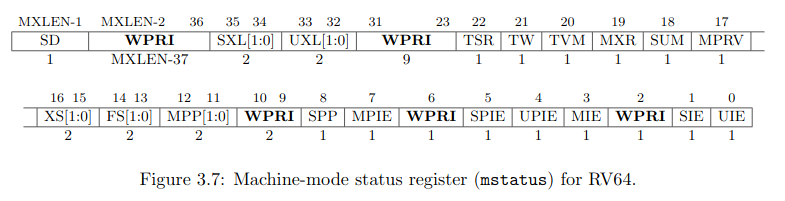
mstatusControl and Status Register (CSR) contains two bits (FS[1:0]) that manage the status of the FPU. The FPU can be enabled by settingFSto01. -
Ensure that the FPU is enabled globally. The initial value for
mstatusis set in the functionstart, the first C function executed in the kernel. You can see thatmstatusis first read into the variablex(great name!) via the functionr_mstatus. Then, a number of configuration bits are set inx(you don’t need to understand exactly what these do) beforexis written back tomstatusviaw_mstatus. You can enable the FPU by setting the first bit ofFS(bit 13 ofmstatus) to 1 in the variablex. In C, you can create a number that only has bit 13 set to 1 with the bit-shift operation
(1 << 13). For efficiency reasons, the Linux kernel does not allow floating-point code in kernel mode. Therefore, the FPU will not be enabled globally but only activated when switching to user mode. Most user-mode programs also do not use the FPU, so it may be more energy-efficient not to enable the FPU by default for user-space programs either. The kernel could, for example, catch the exception generated when a floating-point instruction is used while the FPU is off and only then enable the FPU. To keep this exercise simple, we will enable the FPU globally, but feel free to try a more efficient implementation.
Now verify that your test program can run without generating exceptions.
- Create another user program
fpuforktest.c:#include "user.h" double get_sum() { double sum = 0; for (double d = 1.23; d < 100; d *= 1.9) { sum += d; pause(1); } return sum; } int main() { double sum = 0; int rc = fork(); if (rc < 0) { fprintf(2, "fork() failed\n"); exit(1); } if (rc != 0) { sum = get_sum(); wait(0); } else { sum = get_sum(); } printf("Sum: %d\n", (int)sum); return 0; }This program performs the same calculation as the previous one but does so in a parent and a child process. Additionally, a syscall is made in each iteration of the loop.
pause(n)in xv6 will make the calling process pause forn * 100ms. This gives other processes time to execute.Do you notice anything? Run this program multiple times and observe the results.
You have likely noticed that you get inconsistent results. As explained in the book, the code in the trampoline needs to save the general-purpose registers in the trapframe to avoid losing their values. However, the FPU uses different registers, and these are not saved in the trapframe.
- Ensure that the floating point registers (
FLEN= 64 bits) are correctly saved and restored by the trampoline code:- Extend
struct trapframe. - Add code to the trampoline to save all floating-point registers into (use the
fsdandcsrrinstructions) and restore them from (fldandcsrw) the trapframe.
- Extend
- Verify that your test program now does provide consistent results.